
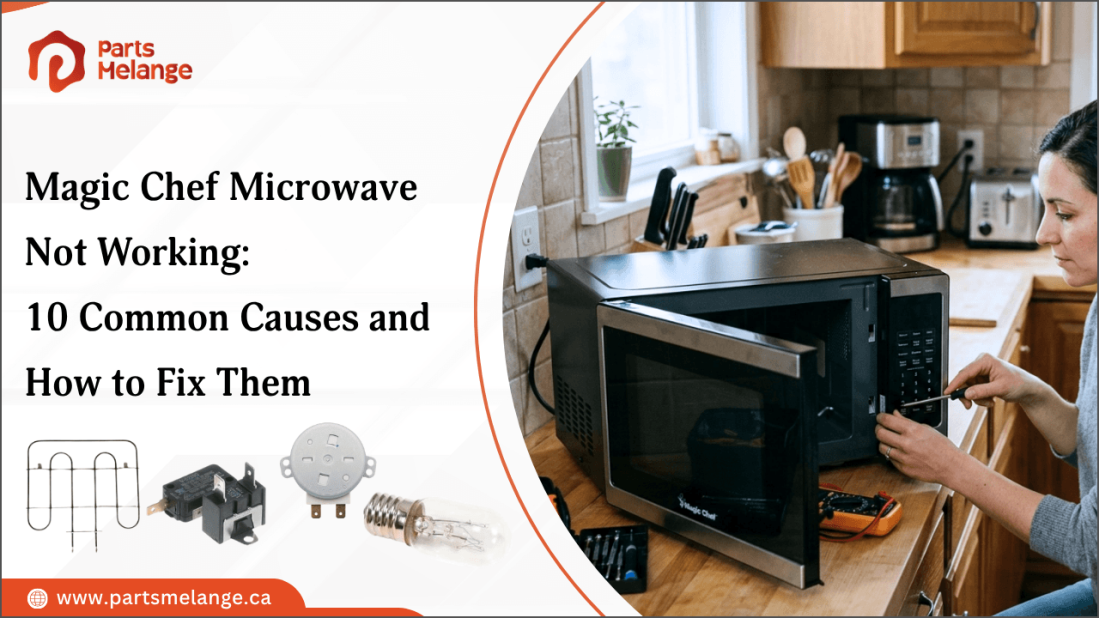
When your Magic Chef microwave stops working, the problem could be something simple like a power issue, faulty door switch, or damaged turntable component. In some cases, the microwave may turn on but fail to heat, make unusual noises, or stop during cooking.
Identifying the exact symptom can help you find the cause before replacing any essential Magic Chef microwave parts.While some problems are easy to troubleshoot, issues involving internal electrical or high-voltage components may require professional service.
This blog covers the most common Magic Chef microwave problems, their causes, and practical solutions.
Understanding Why Your Magic Chef Microwave Is Not Working
The first step is to identify what the microwave is doing when you try to use it. Different symptoms can point to different failed components.
For example:
No display or response: The microwave may have a power supply problem, a blown fuse, or a failed control board.
Display works but microwave will not start: The door switches, control panel, or door latch may be faulty.
Microwave runs but food stays cold: A magnetron, high-voltage diode, capacitor, or other heating component may have failed.
Microwave stops during cooking: Overheating, a defective thermostat, or electrical component may be involved.
Sparking inside: Damaged waveguide covers, metal objects, or burnt interior surfaces can cause arcing.
Turntable does not rotate: The turntable motor, coupler, or control circuit may be damaged.
Unusual buzzing or humming: A failing high-voltage component or magnetron can produce abnormal sounds.
Start With Basic Checks
Before attempting any repair, unplug the microwave and inspect the power cord and outlet. If the microwave is completely unresponsive, check whether another appliance works from the same outlet.
Also verify that the microwave door closes completely. Many models use safety interlock switches that prevent operation when the door is open or not properly latched.
Shop quality home appliance replacement parts at PartsMelange to help keep your everyday appliances working properly. Find durable microwave replacement parts such as door switches, turntable motors, couplers, fuses, control boards, and other essential components for your repair needs.
10 Common Magic Chef Microwave Problems and Their Fixes
A Magic Chef microwave can show different symptoms depending on the part causing the problem. Here are the most common issues, their likely causes, and practical fixes.
1. Magic Chef Microwave Has No Power
If your microwave has no display, light, or response, the issue may be with its electrical supply or internal power components.
Common causes:
Tripped circuit breaker
Faulty wall outlet
Blown internal fuse
Fix: Test the outlet with another appliance and reset the breaker if necessary. If the outlet works but the microwave remains unresponsive, the internal fuse or another electrical component may need to be inspected.
2. Microwave Has Power but Will Not Start
A working display with no cooking response often points to the door safety system or control components.
Common causes:
Faulty door switch
Damaged door latch
Defective control panel
Fix: Make sure the door closes completely and the latch is not damaged. If the microwave still will not start, the door switches or control components may need replacement.
3. Microwave Runs but Does Not Heat
When the fan, light, and turntable operate but food stays cold, the heating circuit may be faulty.
Common causes:
Failed magnetron
Defective high-voltage diode
Faulty capacitor
Fix: Test the microwave by heating a cup of water. If it does not heat, have the heating circuit professionally diagnosed because these components involve high voltage.
4. Microwave Stops During Cooking
A microwave that shuts down before the timer finishes may be overheating or experiencing an electrical fault.
Common causes:
Blocked ventilation
Faulty cooling fan
Defective thermostat
Fix: Clear anything blocking the ventilation openings and let the microwave cool completely. If it continues to shut off, the cooling system or thermostat should be inspected.
5. Microwave Door Will Not Close Properly
A door that does not latch correctly can prevent the microwave from operating.
Common causes:
Broken door hook
Damaged latch
Misaligned hinge
Fix: Inspect the door, hooks, and hinges for visible damage. Do not force the door closed. Replace the damaged component before using the microwave.
6. Microwave Makes a Loud Buzzing Noise
Unusual buzzing or humming can indicate a problem with the heating or electrical system.
Common causes:
Failing magnetron
Damaged high-voltage diode
Transformer problem
Fix: Stop using the microwave if the noise is unusually loud or occurs with poor heating, sparks, or a burning smell. Have the internal components inspected by a qualified technician.
7. Microwave Produces Sparks
Sparking inside the microwave can damage the appliance and should be addressed immediately.
Common causes:
Metal objects inside the cavity
Food or grease buildup
Damaged waveguide cover
Fix: Stop the microwave and remove any metal objects. Clean the interior thoroughly and inspect the waveguide cover. If sparking continues, discontinue use and have the microwave inspected.
8. Turntable Does Not Rotate
If the microwave heats but the glass tray remains stationary, the turntable drive system may be the problem.
Common causes:
Damaged turntable coupler
Failed turntable motor
Misaligned roller guide
Fix: Remove and reseat the glass tray and roller guide. Inspect the coupler for damage. If the tray still does not rotate, the motor or coupler may need replacement.
9. Control Panel Buttons Do Not Respond
Unresponsive buttons can prevent you from selecting settings or starting a cooking cycle.
Common causes:
Damaged touchpad
Faulty control board
Moisture or residue around controls
Fix: Disconnect the microwave from power and allow it to reset. Clean the control panel carefully. If the buttons remain unresponsive, the touchpad or control board may need to be replaced.
10. Microwave Has a Burning Smell
A burning odor can come from food residue or an overheated electrical component.
Common causes:
Burnt food or grease buildup
Electrical component failure
Damaged wiring
Fix: Stop using the microwave and let it cool. Clean the interior and check for burn marks or visible damage. If the smell returns, disconnect the appliance and have it professionally inspected.
How to Replace Common Magic Chef Microwave Parts
Some Magic Chef microwave problems can be resolved by replacing a worn or damaged part instead of replacing the entire appliance. Before ordering a replacement, always check the exact microwave model number and compare the replacement part's specifications, connectors, and mounting style.
Common parts such as the turntable coupler, roller guide, and some door components may be easier to replace. However, parts connected to the microwave's high-voltage circuit require much greater caution.
Replace the Turntable Coupler
A damaged coupler can prevent the glass tray from rotating properly.
Unplug the microwave.
Remove the glass turntable and roller guide.
Lift out the old coupler.
Install the replacement coupler in the same position.
Reinstall the roller guide and glass tray.
Reconnect the power and check whether the tray rotates.
Replace the Turntable Motor
If the coupler is intact but the turntable still does not rotate, the motor may be faulty.
Disconnect the microwave from power.
Remove the glass tray and roller guide.
Access the turntable motor according to the model's service instructions.
Disconnect the motor wiring.
Remove the old motor and install the correct turntable motor replacement.
Reassemble the components and test the turntable.
Replace a Door Switch
The door switch is part of the microwave's safety interlock system and can prevent the unit from starting when it fails.
Unplug the microwave.
Inspect the door latch and switch assembly.
Access the switch following the model-specific service procedure.
Disconnect the wiring and remove the faulty switch.
Install the matching replacement switch.
Reassemble the components and verify proper door operation.
Safety Considerations for Internal Parts
Parts such as the magnetron, high-voltage diode, capacitor, and transformer should not be replaced as a routine DIY repair. Microwave ovens can retain dangerous electrical energy even after they have been unplugged.
If troubleshooting points to a high-voltage component, have the microwave inspected and repaired by a qualified technician. Always use the correct replacement part for the specific Magic Chef model.
When to Repair or Replace Your Magic Chef Microwave
Choosing between repair and replacement depends on the microwave's condition, the type of failure, and the expected repair cost. A minor part failure may be worth fixing, while extensive damage or repeated breakdowns can make replacement more practical.
The following factors can help you decide whether repairing or replacing your Magic Chef microwave is the better option.
Factor | When to Repair | When to Replace |
Repair Cost | The repair is relatively inexpensive. | The repair cost is close to the price of a new microwave. |
Type of Problem | Only a minor or replaceable part has failed. | Major components or multiple parts have failed. |
Age | The microwave is in good condition and has plenty of useful life left. | The microwave is older and has frequent problems. |
Overall Condition | The door, cavity, controls, and exterior are in good condition. | The door, cavity, or other major areas have significant damage. |
Part Availability | Replacement parts are readily available. | Important replacement parts are discontinued or difficult to find. |
Repair History | The microwave has had few previous repairs. | It requires repeated repairs or develops new problems often. |
Performance | The microwave works well after a minor repair. | Heating or other major functions remain unreliable after repairs. |
Before making a decision, check the complete Magic Chef model number and compare the repair cost with the price of a suitable replacement. For high-voltage component failures, professional inspection is recommended.
Summary: Expert Tips to Keep Your Magic Chef Microwave Working Longer
A Magic Chef microwave can stop working because of simple issues such as power problems, damaged door components, blocked ventilation, or turntable failures. Identifying the symptoms and checking the likely causes can help prevent unnecessary part replacements and keep the appliance working properly.
Regular cleaning, proper ventilation, careful use of the door and turntable, and timely replacement of worn parts can help extend the microwave's service life. For problems involving the magnetron, capacitor, diode, transformer, or other high-voltage components, professional inspection is the safer choice.
Key Takeaways
Identify the microwave's symptoms first to narrow down the possible cause.
Keep the door, turntable, vents, and interior clean and in good condition.
Use model-specific replacement parts when repairs are needed.
Compare the repair cost and overall appliance condition before replacing the microwave.
Have high-voltage components inspected or repaired by a qualified technician.
FAQs
Why is my Magic Chef microwave not turning on even though it has power?
A blown fuse, faulty door switch, damaged power cord, or control board may prevent startup. Check the outlet and breaker before seeking professional inspection.
Why does my Magic Chef microwave run but not heat food?
A failed magnetron, high-voltage diode, capacitor, or transformer can cause heating failure. Professional diagnosis is recommended because these components involve dangerous high voltage.
Can I replace a Magic Chef microwave fuse myself?
A fuse can be replaced, but it may indicate another electrical fault. Because microwaves retain dangerous voltage, professional replacement is safer unless properly trained.
How long does a Magic Chef microwave typically last?
A Magic Chef microwave can last many years depending on usage, maintenance, ventilation, and operating conditions. Proper cleaning and careful use can extend its service life.
Which Magic Chef microwave parts fail most often?
Commonly affected parts include door switches, latches, turntable motors, couplers, fuses, control components, and magnetrons, depending on the model and frequency of use.
Disclaimer: This blog is for informational purposes only and provides general guidance on Magic Chef microwave troubleshooting, maintenance, and replacement parts. |




Please complete your information below to login.
Sign In
Create New Account